Home 

IBM PC Family  -  Low-Level Format on MFM and RLL Hard Drives


Note:  Hard drives and controller cards that use the ST-506/ST-412 interface, are commonly referred to as "MFM" and "RLL".


Introduction

Creating a hard disk of DOS has three stages:

Stage Activity    Crude description
Stage 1 Low-level format Get the controller to low-level format the drive.  There is no universal way to perform a low-level format - refer to the controller's user manual.  In low-level formatting the drive, the controller is creating sectors on the platters.  After this is done, the controller has the ability to read/write data in the created sectors.
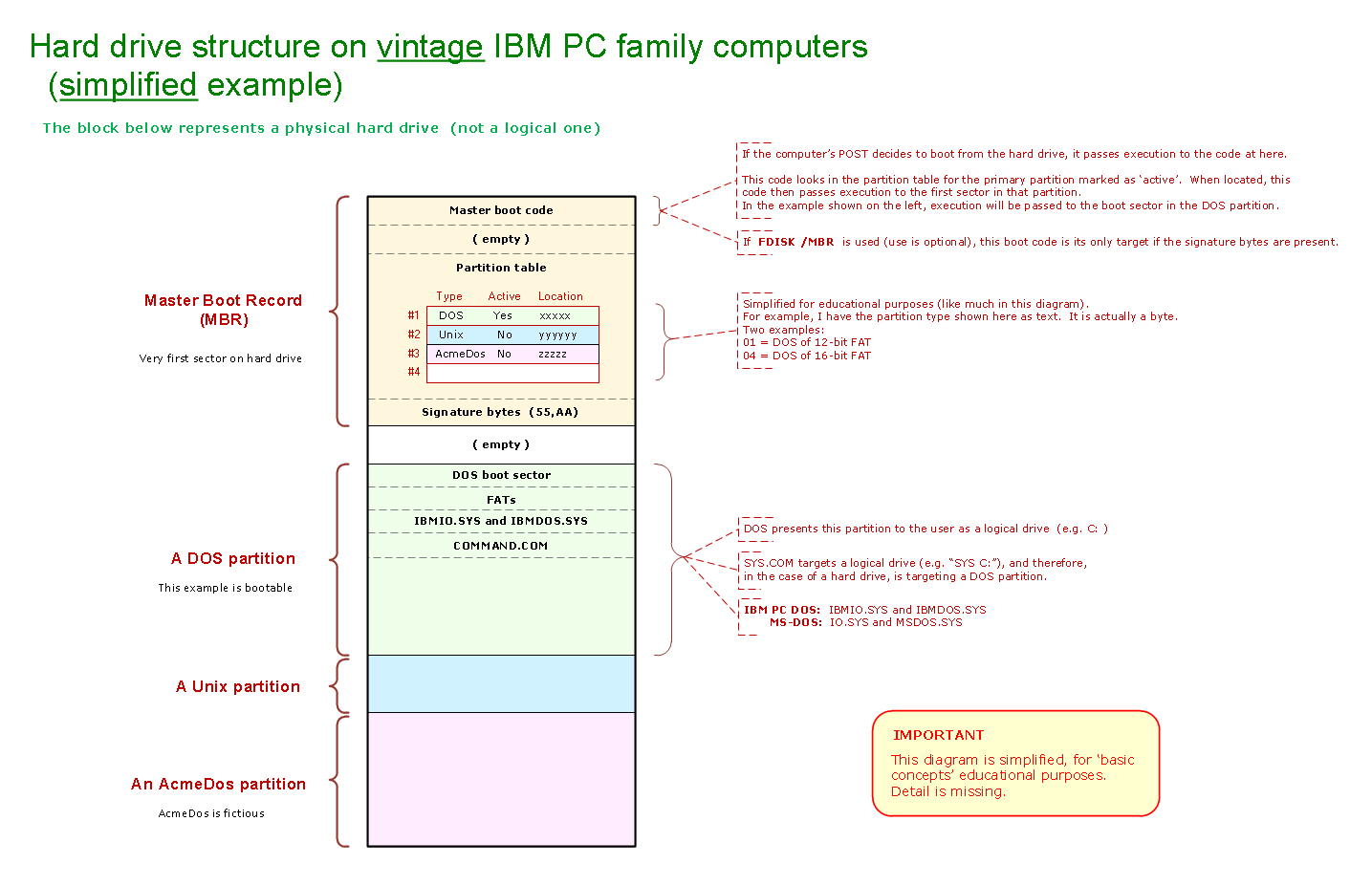
Stage 2 Partition Here, you use FDISK to create/define a DOS partition.  As part of that, FDISK 'builds' the master boot record (MBR), the first sector on the hard drive.
Stage 3 High-level format Here, you use FORMAT to high-level format the DOS partition.  FORMAT will add certain DOS components (e.g. FAT) into the DOS partition, and scan the partition, looking for sectors that cannot be read.


This web page is about stage 1, low-level formatting.


Almost no drive portability between controller cards

When you low-level format an MFM/RLL hard drive, the controller card is writing a particular low-level format (pattern of ones and zeros) onto the drive's platters.  A simplified diagram is at here.

There is no international standard of low-level format put down by MFM/RLL hard disk controllers.  An example low-level format, that of the Western Digital WD1002S-WX2, is shown at here.  The lack of a standard causes hard drive portability issues.

Example

I have two computers:

•  IBM 5160 (IBM XT) computer fitted with IBM Fixed Disk Adapter and Seagate ST-412 MFM drive.
•  Clone XT computer fitted with Western Digital WD1002A-WX1 MFM controller and Seagate ST-225 MFM drive.

Both computers are fully functional, including booting to their respective hard drives.  In the clone computer, if I substitute the ST-412 in place of the ST-225, I will discover that the WD1002A-WX1 cannot read any of the sectors on the ST-412.  That is because the WD1002A-WX1 does not 'understand' the low-level format that was put on the ST-412's platters by the IBM Fixed Disk Adapter.

If I want the combination of WD1002A-WX1 and ST-412 to work, I will need to pretend that the ST-412 is blank (like, 'fresh from the factory'), and go again through all three stages mentioned in the introduction above.  Yes, that is going to remove all user data that is on the ST-412.

Exceptions

There are some exceptions.

For example.  There are three variations of the IBM Fixed Disk Adapter.  I can move a hard drive between all three variations (i.e. all three put down the same low-level format).

For example.  As experienced by me, there are a few Western Digital MFM controllers that put down the same low-level format.

For example.  Some time in the 1990's, I was asked to do data recovery in a situation where the 8-bit MFM hard disk controller card had failed.  The main chip (the 'controller chip') on the controller card was a HDC9224.  I discovered that I owned a controller card of different make-model that also had a HDC9224 on it, and discovered that my card could successfully read the hard drive.


Some known aliases

•  SpeedStor software uses the term 'initialize' instead of low-level format.

•  In the manual for the Transteque model HC-100, 'physical format' is used instead of low-level format.


Misconception

Some people who are 'new' to low-level formatting, have the misconception that to perform a low-level format using an MFM/RLL controller, one starts DEBUG.COM and then within DEBUG, types in G=C800:5
In some cases yes, G=C800:5 is used, in other cases no.

G=C800:5 is for MFM/RLL controllers that have BIOS expansion ROM starting at address C8000 (C800:0), and, there is low-level formatting code starting at offset 5 within that ROM.  That is not always the case.

•  For example, G=C800:5 does not work for the IBM Fixed Disk Adapter, the MFM controller that IBM supplied in the IBM 5160 (IBM XT).  That controller has a BIOS expansion ROM starting at address C8000, but there is no low-level formatting code starting at offset 5.  Low-level formatting using that controller is done in other ways.

•  For example, some OMTI made controllers use G=C800:6, not G=C800:5

•  For example, some Adaptec made controllers use G=C800:CCC, not G=C800:5

•  For example, AT-class MFM/RLL controllers do not have a BIOS expansion ROM.

For low-level formatting instructions, refer to the user manual for the controller/computer.


ESDI

ESDI (Enhanced Small Disk Interface), drives and controllers, are probably in the same situation.


File recovery

Particular situation:  You have an MFM/RLL hard drive, and you know that it was used in a computer for DOS.  You do not know the make-model of controller used to low-level format the drive, and you want to see what files are on the drive.

Be aware of the product at here.  It may be able to read the sectors on your drive.  If so, it may be able to create a single file of the data in those sectors; a file that you can mount in a DOS emulator on a modern computer.